Office 365 Adoption content pack

Overview of the Office 365 Adoption content pack

Use the Office 365 Adoption content pack within Power BI to gain insights on how your organization is adopting the various services within Office 365 to communicate and collaborate. You can visualize and analyze Office 365 usage data, create custom reports and share the insights within your organization and gain insights into how specific regions or departments are utilizing Office 365.

The content pack gives you access to a pre-built dashboard that provides a cross-product view of the last 12 months an  contains a number of sections. Each section provides you with specific usage insights. By clicking on the top level metrics you can access more detailed reports. User specific information is available for the last month.

See Enable the Power BI adoption content pack for Office 365 to start collecting data.
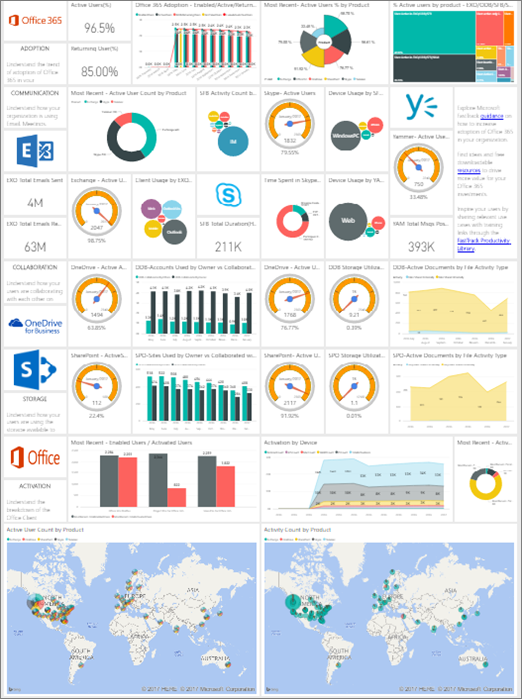
A screen shot of the list of reports included in the adoption content pack

Reade more:

https://support.office.com/en-gb/article/Office-365-Adoption-content-pack-77ff780d-ab19-4553-adea-09cb65ad0f1f?ui=en-US&rs=en-GB&ad=GB&fromAR=1&sp=6364168217082812508915


How to find Office 365 Tenant Id

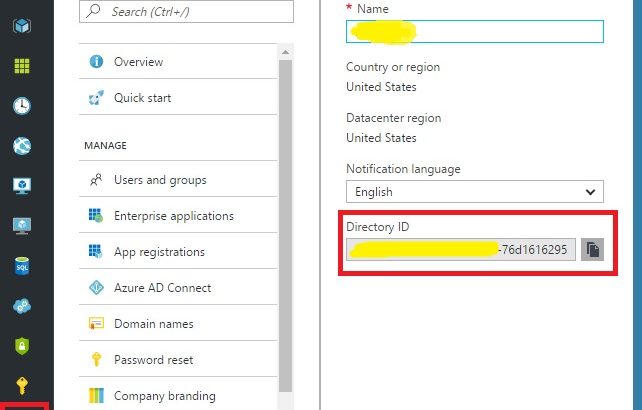
Find your Office 365 Tenant ID via the Azure AD Portal

http://blog.velingeorgiev.pro/how-find-office-365-tenant-id-new-azure-ad-portal

Use Powershell

https://support.office.com/en-us/article/Find-your-Office-365-tenant-ID-6891b561-a52d-4ade-9f39-b492285e2c9b?ui=en-US&rs=en-US&ad=US

You can use Windows PowerShell to find the tenant ID. You’ll need the Microsoft Azure PowerShell module.

Open a Microsoft Azure PowerShell command window and run the following script, entering your Office 365 credentials when prompted.

Login-AzureRmAccount Your tenant ID is listed in the output.

Or use your webbrowser

https://login.windows.net/YOUROFFICE365DOMAINNAME.onmicrosoft.com/.well-known/openid-configuration

SharePoint Online limits

SharePoint Online Limits

Source: https://technet.microsoft.com/library/mt842345.aspx

Find the SharePoint Online limits for Office 365 Enterprise plans and for standalone plans.

Feature Office 365 Business Essentials Office 365 Business Premium Office 365 Education Office 365 Enterprise E1 Office 365 Enterprise E3 Office 365 Enterprise E5

Office 365 E5 Education

and F1

Storage 1 TB per organization plus 0.5 GB per license purchased 1 TB per organization plus 0.5 GB per license purchased 1 TB per organization plus 0.5 GB per license purchased 1 TB per organization plus 0.5 GB per license purchased 1 TB per organization plus 0.5 GB per license purchased 1 TB per organization plus 0.5 GB per license purchased
Terms in store 200,000 200,000 200,000 200,000 200,000 200,000
Storage for site collections Up to 25 TB per site collection or group Up to 25 TB per site collection or group Up to 25 TB per site collection or group Up to 25 TB per site collection or group Up to 25 TB per site collection or group Up to 25 TB per site collection or group
Site collections per tenant 500,000 per organization 500,000 per organization 500,000 per organization 500,000 per organization 500,000 per organization 500,000 per organization
File upload limit 15 GB 15 GB 15 GB 15 GB 15 GB 15 GB
Number of users Up to 300 Up to 300 1– 500,000 1– 500,000 1– 500,000 1– 500,000