SharePoint Roadmap Pitstop: June 2020

June 2020 brought a lot – 100GB file uploads, Microsoft Search: Acronym Answers, site analytics updates, Quick Edit updates for lists and libraries, a new default teal site theme, sharing links to block downloads of PDFs, images and audio, and more. Details & screenshots below, including our audible companion: The Intrazone Roadmap Pitstop: June 2020 podcast episode – all to help answer, “What’s rolling out now for SharePoint and related technologies into Microsoft 365?”

https://techcommunity.microsoft.com/t5/microsoft-sharepoint-blog/sharepoint-roadmap-pitstop-june-2020/ba-p/1498777

On-demand training sessions for SharePoint, OneDrive, Teams, Yammer, and Stream – 2020-H2

This series of training videos covers the value and recent updates across SharePoint, OneDrive, Microsoft Lists, Microsoft Teams, Project Cortex, Yammer, and Stream  – including information for employees, admins, and developers – all in the context of scenarios supported within Microsoft 365 across teamwork and employee engagement.

It is all here in one blog post, inline… consume at your leisure.

Scroll down and learn about all as you go or click each title in the grid below to jump down the page to watch specific sessions – each with related links to learn more:
On-demand training sessions for SharePoint, OneDrive, Teams, Yammer, and Stream – 2020-H2


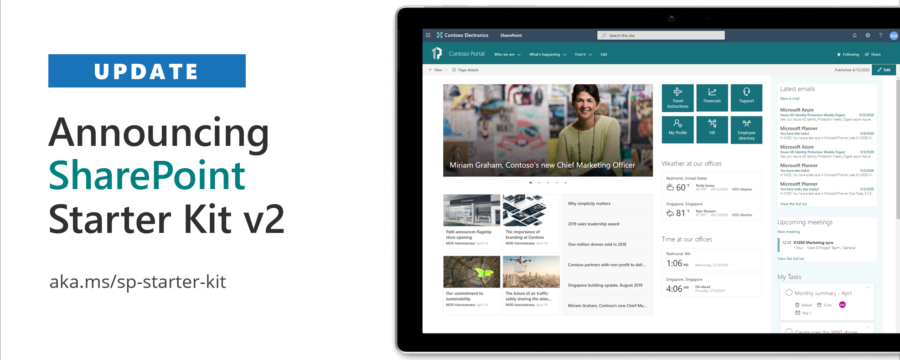
Announcing SharePoint Starter Kit v2 – Microsoft 365 Developer Blog

The SharePoint Starter Kit (starter kit) is a comprehensive solution designed for SharePoint Online and SharePoint 2019 which provides numerous SharePoint Framework (SPFx) web parts, extensions, and other components, as well as PnP PowerShell driven provisioning which you can use as an example and inspiration for your own customizations.

Source: Announcing SharePoint Starter Kit v2 – Microsoft 365 Developer Blog

What’s New with Microsoft 365 | June 2020 – YouTube

This month, we cover new syncing options in Microsoft Edge for you and your users, improvements for managing Microsoft 365 Groups, how to get the new FastTrack Microsoft 365 set-up guides, and other updates in the admin center and the productivity apps.

0:00 – Welcome to the latest episode of What’s New with Microsoft 365 0:37 – Microsoft Edge https://msft.it/6008TlY4s
1:29 – Microsoft 365 Groups https://msft.it/6009TlYfS
2:13 – Safe Documents https://msft.it/6004TlY4I
3:21 – Remote Work Setup Guides https://msft.it/6001TlY4f
4:09 – Microsoft Forms in Teams https://msft.it/6005TlYfT
4:54 – Visio add-in Excel https://msft.it/6003TlYfb
5:44 – Visio for the web https://msft.it/6008TlYfg

Get the latest updates on our best-in-class productivity apps and intelligent cloud services, and rethink productivity, streamline business processes, and protect your business with Microsoft 365: https://msft.it/6006TlYfK

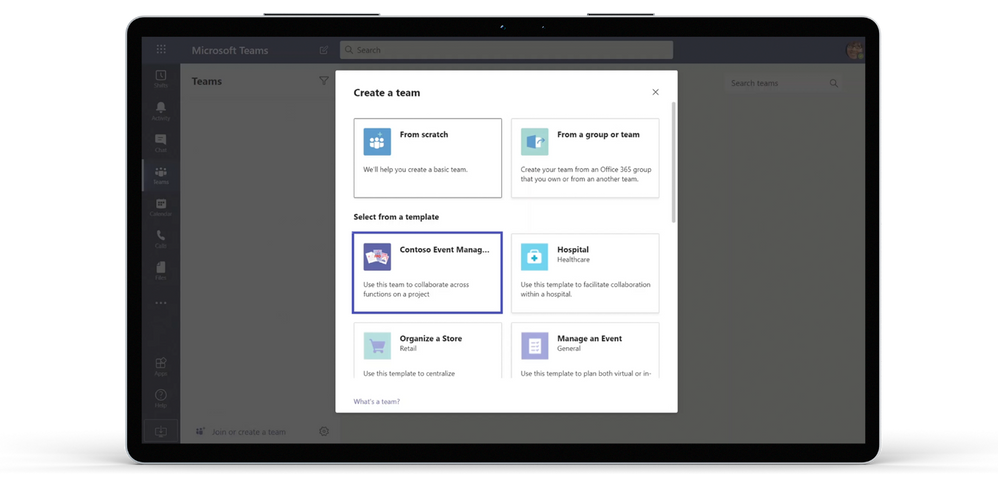
Create teams quickly with Templates in Microsoft Teams – Microsoft Tech Community – 1394163

Source: Create teams quickly with Templates in Microsoft Teams – Microsoft Tech Community – 1394163

Today we are thrilled to announce Templates in Microsoft Teams, enabling you to create effective teams faster and more easily than ever.

With Templates in Teams, users can choose from a variety of customizable templates when creating a new team, helping them get started quickly. IT professionals can also create new custom templates for their organization, allowing them to standardize team structures, surface relevant apps, and scale best practices. Templates in Teams will roll out in the next few months.

More: Create teams quickly with Templates in Microsoft Teams – Microsoft Tech Community – 1394163
8.png


Interactive Yammer emails coming to Outlook for Windows, Mac, and mobile apps! – Microsoft Tech Community – 1372086

Source: Interactive Yammer emails coming to Outlook for Windows, Mac, and mobile apps! – Microsoft Tech Community – 1372086

Outlook is the one app to organize your personal communications and time commitments. And now, we’re rolling out a new Yammer integration to make it easier to stay connected to what’s happening in your communities and on top of what’s new in your inbox. You’ll be able to engage with Yammer conversations in Outlook where you can like and respond to the posts from the reading pane of your new message. This way you can stay on task while keeping up with important conversations and announcements from Yammer.

Outlook_Family.png